

A good mouse pad gives your mouse a consistent surface, protects your desk, and can make long computer sessions more comfortable. The right choice depends on size, surface feel, movement style, and budget. For most people, a cloth model remains the simplest starting point. For a closer look at this, see Capture Card.
For most buyers, a medium or large cloth mat with a non-slip rubber base is the safest choice. It balances comfort, control, price, and easy storage. Choose an extended desk mat for wide arm movements. Pick hard plastic or glass only when you want a faster glide and accept a firmer feel.
Mouse Mat Types at a Glance
| Type | Best for | Glide | Comfort | Main drawback |
|---|---|---|---|---|
| Cloth | Most office users and gamers | Balanced to controlled | Soft | Needs deeper cleaning |
| Hard plastic | Fast movement and easy cleaning | Fast | Firm | More surface noise |
| Glass | Enthusiasts who want low friction | Very fast | Firm | High price |
| Extended desk mat | Large desks and low-sensitivity gaming | Depends on fabric | Soft | Takes more space |
Soft surfaces aren’t all alike. Their weave and construction can create different levels of friction and glide. Hard models made from plastic, metal, or glass tend to stay firm under pressure.
Key takeaways
- Cloth suits the widest range of buyers.
- Large desk mats work well for wide mouse movements.
- Hard and glass surfaces favor a quicker glide.
- A non-slip base matters more than decorative extras.
- Your desk dimensions should determine size before style does.
How to Choose a Mouse Pad for Your Setup
Buying the right surface becomes easier when you decide what matters before comparing brands.
1. Measure your usable desk space
Start with the area beside your keyboard. Don’t rely only on the dimensions shown in product photos.
Office users often need enough room for small wrist and hand movements. Gamers using lower sensitivity may need much more horizontal space.
An extended mat can cover both the keyboard and the pointing area. That creates one level surface while protecting a larger part of the desk.
2. Decide whether you prefer speed or control
A smoother, lower-friction surface lets the mouse move with less resistance. That can suit fast games or people who prefer light movements.
More textured cloth provides extra stopping resistance. Many players prefer that feel when accurate stopping matters.
Material alone doesn’t determine speed. Cloth surfaces can be designed with different glide characteristics, so look at the manufacturer’s stated surface type rather than assuming every fabric model feels slow.
3. Check the base and edges
A slippery base can make a good top surface frustrating. Rubber or another grippy backing helps keep the mat in place.
Stitched edges can also reduce the chance of fabric layers separating or fraying. They matter more on large mats because your forearm crosses the edge frequently.
Thickness is mainly a comfort preference. A thicker soft mat can cushion small desk imperfections, while a thin model gives a firmer feel.
4. Think about your mouse sensitivity
High-sensitivity users make smaller physical movements. They can usually work with a compact surface.
Low-sensitivity players sweep farther across the desk. A large or extended design gives them more room before reaching an edge.
Measure your real movement during normal use. That simple check is more useful than buying an XL model because it looks impressive.
5. Set your budget around the surface, not RGB
Current 2026 gaming recommendations show a wide price spread. PC Gamer lists a budget cloth option around $10, a hard model around $20, premium cloth models around $40 to $50, and some premium hard or glass choices around $100.
That range shows why extra features deserve scrutiny. Lighting, charging systems, and elaborate designs can increase the price without improving the basic tracking surface.
Cloth vs. Hard vs. Glass: Pros and Cons
Cloth surfaces
Pros
- Comfortable against the hand and forearm
- Available in many sizes
- Wide choice of speed and control levels
- Easy to roll or transport
- Budget models are widely available
Cons
- Fabric collects skin oils and dust
- Cleaning takes longer than wiping a hard surface
- Unstitched edges can wear over time
Cloth is the strongest general recommendation because it works for office use, casual gaming, and many competitive setups.
Hard plastic surfaces
Pros
- Low resistance
- Easy to wipe clean
- Firm and consistent feel
- Good choice for compact setups
Cons
- Less cushioning
- Mouse movement may sound louder
- The fast feel won’t suit everyone
PC Gamer’s current guide, for example, lists the Logitech G440 as a lower-priced hard option and describes its surface as low-friction.
Glass surfaces
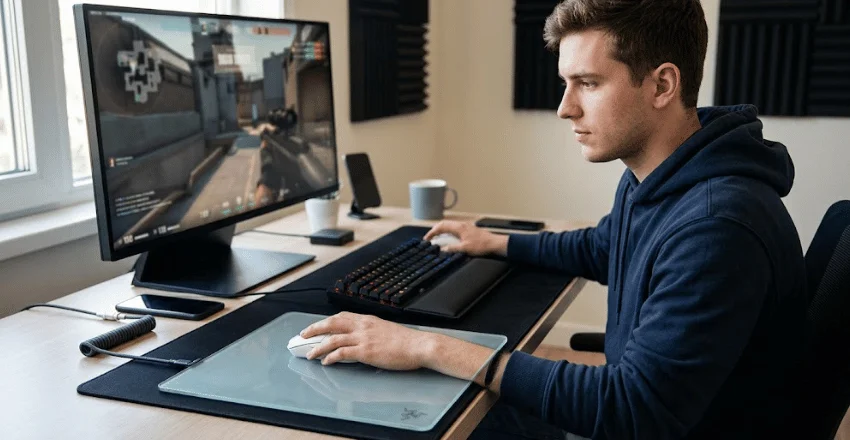
Pros
- Fast, consistent glide
- Easy surface cleaning
- Doesn’t absorb sweat or oils like cloth
- Appeals to players who want minimal resistance
Cons
- Costs much more than basic cloth
- Can feel cold or firm
- Skin may drag against the glass in warm conditions
- Some models can increase wear on mouse skates
Current glass recommendations sit near the premium end of the category. PC Gamer notes both the low-friction advantage and practical issues such as arm stickiness and mouse-skate wear. Razer also uses micro-etched glass on its Atlas line to support optical-sensor tracking.
Extended desk mats
An extended model makes sense if you want one surface beneath both your keyboard and mouse. It also protects more of the desktop.
The tradeoff is size. Washing and drying a large fabric mat takes more space, and oversized models can crowd smaller desks.
For more computer and device coverage, you can browse Newsdean’s Tech section.
What Should You Expect to Pay in 2026?
Price varies sharply by brand, size, material, and extra features.
As a rough US guide, budget cloth models start at around $10, and common hard gaming surfaces sit around $20. Premium cloth models land around $40 to $50, and glass options reach about $100. Prices can change after publication.
You don’t need the most expensive option for ordinary work. A well-sized cloth surface with secure backing covers the main needs of most buyers.
Spend more when you know what you’re paying for. Larger dimensions, specialized surface tuning, premium glass, wireless charging, or lighting can justify higher prices for specific users.
What About Wrist Support?
A cushioned wrist or palm rest can feel comfortable, but placement matters.
OSHA advises that a rest should contact the heel or palm of the hand during resting periods rather than press directly against the wrist. It also recommends arranging the workstation so the wrist can stay in a neutral position.
Don’t expect a raised cushion to correct a poorly positioned desk on its own. Chair height, keyboard position, desk height, and mouse placement work together.
If you’re interested in other everyday technology troubleshooting, Newsdean also has a guide explaining common Messenger availability errors.
How to Clean and Maintain the Surface
Check the manufacturer’s instructions first, as materials vary.
For washable cloth models, gentle hand cleaning is often the safest method. Glorious recommends warm water, dish soap, gentle scrubbing, thorough rinsing, towel-drying, and then air-drying. Its guide suggests allowing roughly 24 to 36 hours for complete air drying when possible.
For routine care:
- Remove crumbs and loose dust regularly.
- Keep drinks away from untreated fabric.
- Wipe hard surfaces with a suitable soft cloth.
- Never reconnect powered RGB or charging mats while they’re wet.
- Let washed fabric dry fully before putting it back on the desk.
Regular cleaning also keeps the glide more consistent by removing oils and debris from the surface.
Verdict: Which Type Should You Buy?
Choose cloth unless you already know you prefer something else. It gives most people the best mix of comfort, price, size choices, and usable control.
Pick a large cloth or extended design if you game at low sensitivity. Choose a standard medium size when desk space matters more.
Go hard when easy cleaning and quick movement are priorities. Glass makes the most sense for enthusiasts who understand its faster feel and higher cost.
Before buying, measure your usable desk area and compare the dimensions with your normal mouse movement. That five-minute check can prevent both an undersized gaming surface and an oversized desk mat.
Mac users looking for more practical device guides can also read Newsdean’s YouTube-to-MP3 guide for Mac.
Frequently Asked Questions
Not always. A modern mouse may track acceptably on many desks. A dedicated surface still gives you more predictable friction, protects the desktop, and avoids problems caused by unsuitable glossy or reflective finishes.
Neither is automatically better. Cloth offers more cushioning and many control options. Hard surfaces usually feel faster and are easier to wipe clean. Your preferred sensitivity and stopping control should guide the choice.
A desk mat is better when you want keyboard coverage, more arm space, or broader desk protection. A smaller model is easier to clean, transport, and fit into compact workspaces.
They can be worth it for users who want a consistent, low-friction surface. For everyday office use or casual gaming, a good cloth option usually costs less and requires less adjustment. Current premium glass recommendations can reach about $100.
Clean it when you notice visible dirt, oily areas, or a change in glide. Light dusting can be done often. Deeper washing depends on the material and the manufacturer’s care instructions.

